
A blog post structured for SEO rankings places the direct answer to the primary search query within the first 100 words, organizes supporting information under keyword-informed H2 and H3 headers, and formats the content so both Google’s crawlers and human readers can extract value from every section independently. Structure is not a formatting preference — it’s a ranking signal that determines whether Google understands what your content is about, how authoritatively it covers the topic, and whether it deserves to appear above the tens of thousands of competing pages targeting the same keywords.
This guide covers every dimension of blog structure that influences SEO rankings: information architecture, header hierarchy, content depth signals, internal linking, schema markup, featured snippet optimization, and the readability factors that reduce bounce rates and increase dwell time — all of which compound into ranking advantage. Whether you’re building a content program in-house or working with an SEO agency in Chennai, these are the structural principles that separate page-one content from content that never gets found.
Why Blog Structure Matters as Much as the Words You Write
Most content teams invest the majority of their effort in what they write — research, topic selection, keyword targeting. Relatively few invest equivalent attention in how that content is structured. This is a strategic gap, because Google’s algorithms evaluate structure as a primary signal of content quality and topical depth.
The data makes the case clearly:
- According to Backlinko’s analysis of 11.8 million Google search results, the average first-page result contains 1,447 words — but it’s the organization of those words into logical, scannable sections that signals topical depth to Google’s crawlers. Length alone does not predict ranking; structural depth does.
- HubSpot’s research found that articles with 6–13 word headlines attract the most organic traffic — because this range forces specificity that correlates with keyword alignment and click-through rate optimization
- A Semrush study of 700,000 articles found that long-form content (7,000+ words) gets 24% more shares than short articles — but only when that content is well-structured enough to remain navigable and scannable
- According to Nielsen Norman Group’s eye-tracking research, web readers scan content in an F-pattern or Z-pattern — spending most attention on the first two paragraphs and the first few words of every subsequent paragraph. Structure that accounts for this scanning behavior retains readers longer, which reduces bounce rate — a signal Google uses to assess content quality.
- Google’s Search Quality Evaluator Guidelines explicitly evaluate content structure as part of the “page quality” assessment that human raters use to inform algorithm development
The practical implication: a well-structured 1,500-word article on a topic frequently outranks a poorly structured 5,000-word article on the same topic — because structure is how Google determines whether the content is genuinely organized to serve the reader or just padded to appear comprehensive.
The Blog Architecture Framework: Structure Before You Write a Single Word
The most common blog structuring mistake is treating structure as something that happens during or after writing. The most effective approach is to architect the structure — the logical information hierarchy of the post — before writing begins. This ensures the resulting article is built around the reader’s information journey, not around the writer’s stream of consciousness.
Step 1: Define the Primary Search Intent (Not Just the Keyword)
Every keyword has a search intent — the specific outcome the searcher wants from finding content on that topic. Blog structure must match the intent, not just the keyword.
The 4 intent types and their structural implications:
| Intent Type | What the Searcher Wants | Required Blog Structure |
|---|---|---|
| Informational | To understand something | Definition first, then layers of explanation, then examples |
| Navigational | To find a specific resource or page | Less relevant for blog posts — use for landing pages |
| Commercial | To compare options before buying | Comparison tables, pros/cons, criteria frameworks |
| Transactional | To take an action | Process steps, specific how-to sections, clear CTAs |
For most blog posts, the intent is informational or commercial. Structural misalignment with intent is one of the most common reasons well-written content underperforms — informational structure applied to a commercial intent keyword leaves buyers without the comparison framework they need.
How to verify search intent before structuring:
- Search the target keyword in Google’s incognito browser
- Analyze the top 5 results: What format do they use? (Guide, listicle, how-to, comparison?)
- Note the approximate depth of coverage in top-ranking results
- Identify the “angle” — the specific perspective that best-ranking content takes
- Structure your post to match the dominant format while adding the depth or perspective that top results lack
Step 2: Build the Content Outline Using the MECE Principle
MECE (Mutually Exclusive, Collectively Exhaustive) is a logic framework from consulting methodology — but it’s one of the best frameworks for blog content structure. Applied to blog architecture:
- Mutually Exclusive: Each H2 section covers a distinct aspect of the topic — no significant overlap between sections
- Collectively Exhaustive: The full set of H2 sections covers the topic completely — a reader who finishes the post has everything they need
MECE structure is what Google’s Quality Raters assess when evaluating whether a page provides comprehensive, organized coverage of a topic. It’s also what turns content into featured snippet candidates, because each self-contained section can be extracted and presented independently as a direct answer.
Building the MECE outline:
- Write the title/H1 that defines the topic scope
- List every major subtopic that a complete treatment of this topic requires
- Check for overlap: do any two subtopics substantially cover the same ground?
- Check for gaps: is there any major dimension of the topic not represented?
- Order the subtopics in the sequence that makes most sense for a reader learning the topic from scratch
- Assign each subtopic as an H2; any subsections within an H2 become H3s
H1 and Title Tag: The SEO Foundation of Every Blog Post
The H1 (the main heading visible on the page) and the title tag (the text that appears in Google search results) are the two most important structural elements in any blog post. They communicate the topic, the angle, and the keyword focus to Google with more authority than any other single element.
H1 Optimization: The 5 Rules
Rule 1: One H1 per page, always Multiple H1s on a single page create ambiguity about the primary topic. HTML5 technically allows multiple H1s, but SEO best practice — and Google’s own guidance — recommends a single H1 that clearly defines the page’s primary topic.
Rule 2: Include the primary keyword, naturally The primary target keyword should appear in the H1, as close to the beginning as readability allows. “How to Structure a Blog for Better SEO Rankings” includes the primary keyword phrase while remaining natural and click-worthy.
Rule 3: Match the title tag closely but not necessarily identically The H1 (visible on-page) and the title tag (visible in search results) can differ slightly. The title tag is limited to approximately 60 characters before truncation; the H1 has no such constraint. Use the title tag for keyword + click incentive; use the H1 for a more complete expression of the article’s promise.
Rule 4: Front-load the keyword where possible “Blog Structure for SEO Rankings: A Complete 2025 Guide” places the keyword phrase at the beginning, which correlates with higher CTR because readers scan headlines from left to right and process keyword relevance before deciding to click.
Rule 5: Match the H1 to the meta title closely Google rewrites meta titles that it determines are misleading relative to the page content. When H1 and title tag are closely aligned, the risk of Google substituting its own version is minimized.
Title Tag Formulas That Drive CTR and Rankings
| Formula | Structure | Example |
|---|---|---|
| Keyword + Year | [Topic] in [Year]: [Benefit] | “Blog SEO Structure in 2025: The Complete Guide” |
| Number + Keyword | [Number] Ways to [Keyword Phrase] | “12 Blog Structure Elements That Improve SEO Rankings” |
| How to + Keyword | How to [Accomplish Keyword Outcome] | “How to Structure a Blog Post for Better SEO Rankings” |
| Keyword + Differentiator | [Topic]: [What Makes This Different] | “Blog Structure for SEO: The Framework Google Actually Rewards” |
| Question Format | [Keyword Question] | “What’s the Best Blog Structure for SEO Rankings?” |
CTR optimization beyond keyword inclusion: Including power words that trigger curiosity, urgency, or authority (“Complete,” “Proven,” “Expert,” “2025,” “Data-Backed”) in the title tag consistently improves CTR — and CTR improvement is both a direct traffic benefit and an indirect ranking signal, as Google interprets high CTR as evidence of relevance.
Header Hierarchy: H2, H3, and H4 as Structural SEO Signals
After the H1, the hierarchy of H2, H3, and H4 headers performs two equally important functions: they guide readers through the content as navigational signposts, and they tell Google’s crawlers how the information is organized and what topics the content covers.
The Header Hierarchy Rules
H2 — Major Section Headers H2s represent the primary subtopics of the article — the main sections that divide the content into distinct, self-contained units. Each H2 should:
- Cover a distinct, non-overlapping aspect of the topic
- Be understandable as a standalone question or concept without reading the rest of the article
- Include a relevant keyword, secondary keyword, or semantically related term — naturally, not forcibly
- Be written as the kind of question a searcher might type into Google (many H2s become People Also Ask candidates when formatted as questions)
H3 — Subsection Headers H3s break down H2 sections into specific subtopics, examples, or dimensions. They should:
- Only appear under a parent H2 (never jump from H1 to H3)
- Cover a specific aspect of the H2’s broader topic
- Include secondary keywords or long-tail variations where natural
- Typically contain 150–400 words of content before the next H3
H4 — Detail Headers (Use Sparingly) H4s represent the third level of depth within a specific subsection. They’re appropriate for complex technical topics, step-by-step processes with many steps, or comparison frameworks. Most blog posts don’t need H4s — they’re a signal of either exceptional depth or excessive nesting.
Keyword Distribution Across Headers
The most natural and effective keyword distribution in a well-structured blog post:
| Header Level | Keyword Strategy |
|---|---|
| H1 | Primary keyword, exact or very close match |
| First H2 | Primary keyword variation or synonym |
| 2–3 Additional H2s | Secondary keywords, related phrases, PAA-style questions |
| H3s | Long-tail variations, specific subtopics, supporting terms |
| H4s (if used) | Highly specific terms, tool names, step-specific vocabulary |
What to avoid:
- The same exact keyword in every H2 (keyword stuffing — triggers Helpful Content assessment)
- H2s with no keyword relevance (wasted SEO real estate)
- H2s that are so long they lose the scannability benefit (target under 8 words for H2s)
The Opening Section: Where Featured Snippets Are Won or Lost
The opening section of a blog post — the first 100–200 words — is the most structurally important part of the content for both users and search engines. It determines bounce rate (do readers feel they’ve found what they were looking for?), featured snippet eligibility (does it directly answer the query in the format Google prefers?), and initial quality assessment by Google’s algorithms.
The Answer-First Architecture
The answer-first principle — placing a direct, concise answer to the primary query within the first 100 words — is the most consistently documented technique for winning paragraph-format featured snippets.
Google’s paragraph featured snippets are drawn from content that directly and concisely answers a query. The algorithm identifies the most concise, complete, and authoritative answer on the first page and elevates it to position zero (above all organic results). According to Semrush’s 2024 SERP features study, featured snippets appear in approximately 12.3% of all search queries and capture 35–40% of all clicks on those result pages — often at the expense of the organic position 1 result.
The featured snippet structure for the opening section:
[H1 — matches search query]
[Direct answer in 40–60 words — complete enough to stand alone,
specific enough to be genuinely useful, concise enough to be
extracted as a snippet]
[Supporting context — 2–4 sentences that validate and expand
on the direct answer, earning continued reading]
[Forward navigation — brief indication of what the full article
covers, with implicit promise of additional value]
The critical formatting distinction: Google extracts paragraph snippets from regular paragraph text — not from bullet lists, headers, or tables. For paragraph-type queries (definition, explanation, “what is,” “how does”), the opening paragraph must be in flowing prose, not formatted as a list.
For “how to” queries, list-format featured snippets are more common — in which case the opening section should include a brief numbered summary of the main steps after the initial paragraph answer.
Content Depth Signals: How Google Measures Topical Comprehensiveness
Google’s algorithm doesn’t count words — it evaluates whether a piece of content covers a topic with sufficient depth and breadth to genuinely serve the reader. This is what “topical authority” means in practice: a page that covers all relevant dimensions of a topic signals to Google that it’s a trustworthy, comprehensive source.
The 4 Content Depth Signals Google Evaluates
Signal 1: Semantic Coverage (LSI Keywords) Latent Semantic Indexing (LSI) refers to the related terms, concepts, and vocabulary that naturally appear in expert content on a given topic. A blog post about “blog structure for SEO” that never mentions terms like “H1,” “meta description,” “internal linking,” “featured snippet,” or “schema markup” signals incomplete topical coverage — because expert content on this topic naturally uses these terms.
How to find LSI keywords for any topic:
- Google autocomplete: type your keyword and note the suggested completions
- “People Also Ask” boxes on the SERP: each PAA question is a related semantic concept
- Google’s “Searches related to…” section at the bottom of the results page
- Tools: Surfer SEO (content optimization with semantic analysis), Clearscope, MarketMuse, Semrush’s Topic Research tool
Signal 2: Question Coverage Pages that address multiple related questions within a single post signal to Google that they cover the topic comprehensively. The “People Also Ask” box on any SERP reveals the specific questions Google associates with your target topic — and each one is an H2 or H3 opportunity.
Target: build at least 2–3 PAA questions from your target keyword into your H2/H3 structure. These sections are featured snippet candidates and comprehensiveness signals simultaneously.
Signal 3: Content Structure Richness A post that uses only paragraphs is less structurally rich than one that integrates headers, tables, bullet lists, ordered lists, and images — because structural variety signals that the author has organized information in the format that best serves the reader for each type of content (lists for comparisons, tables for data, steps for processes, paragraphs for explanation).
Signal 4: E-E-A-T Signals Google’s E-E-A-T framework (Experience, Expertise, Authoritativeness, Trustworthiness) is assessed at the content level through: author attribution with credentials, citation of authoritative sources with links, original data or first-hand experience, and transparent editorial standards. Structurally, this means:
- A named author with a linked bio
- External citations with hyperlinks to primary sources
- Original examples, data, or case studies — not just restatements of other content
- Accurate, current statistics (with dates noted)
Internal Linking Structure: The Ranking Architecture Most Blogs Ignore
Internal links — links between pages on the same website — are one of the most underutilized structural tools in blog SEO. They serve three distinct functions: they distribute PageRank (link equity) from high-authority pages to pages that need ranking help, they help Google understand the relationship between pages and the topical structure of the site, and they keep readers engaged by providing pathways to related content.
According to Ahrefs’ research, pages with more internal links pointing to them consistently rank higher for their target keywords than pages with fewer internal links — all else being equal. This means your internal linking architecture is as important as your backlink strategy for distributing ranking authority across your site.
The Internal Linking Strategy for Blog Posts
Rule 1: Every blog post should link out to 3–5 relevant internal pages These links should go to:
- Related blog posts that provide additional depth on specific subtopics
- Service or product pages that are relevant to the blog post’s topic
- Pillar pages or cornerstone content that the post is part of a cluster around
Rule 2: Every blog post should be linked to from at least 3 existing pages After publishing new content, update 3 existing related posts to add a contextual link to the new piece. This is how new content gets discovered by Google’s crawlers quickly and how link equity flows to it from existing pages.
Rule 3: Use descriptive, keyword-rich anchor text
- ❌ “Click here to learn more”
- ❌ “Read this article”
- ✅ “SEO content strategy for Chennai businesses”
- ✅ “on-page SEO optimization guide”
Descriptive anchor text tells Google what the linked page is about, reinforcing the keyword relevance of the destination page.
Rule 4: Link from high-traffic, high-authority pages to important conversion pages If your blog has a high-traffic post that attracts significant organic visitors, use internal links from that post to direct some of that traffic to service pages or high-conversion landing pages. This is how an SEO company in Chennai leverages blog authority to support commercial page rankings.
Rule 5: Avoid orphan pages Orphan pages — pages with no internal links pointing to them — are effectively invisible to Google’s crawlers after their initial discovery. Run a regular orphan page audit using Screaming Frog and add internal links to any orphaned content.
The Topic Cluster Internal Linking Model
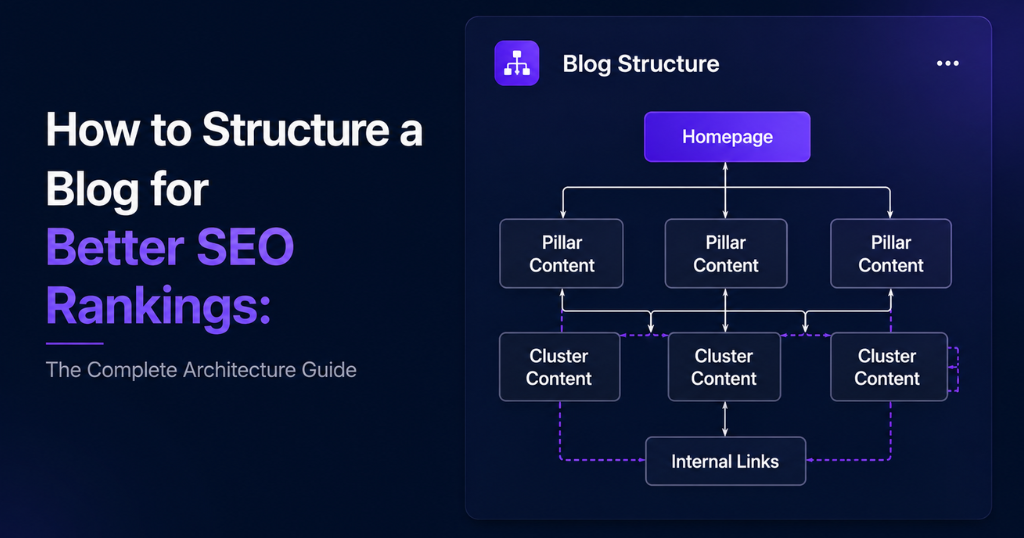
The most structurally effective internal linking architecture for SEO is the topic cluster model, where:
- One pillar page covers a broad topic comprehensively (e.g., “The Complete Guide to Blog SEO”)
- Multiple cluster pages cover specific subtopics in depth (e.g., “How to Structure a Blog for SEO Rankings,” “How to Research Keywords for Blog Posts,” “How to Build Links to Blog Content”)
- Internal links connect every cluster page back to the pillar page AND to other related cluster pages
This architecture signals topical authority to Google — the pattern of internally linked pages covering multiple dimensions of a topic tells the algorithm that this site is a deep, comprehensive resource on the subject.
Formatting for Featured Snippets: Winning Position Zero
Featured snippets are the highest-visibility positions available in organic search — appearing above all paid and organic results — and they’re won almost entirely through formatting decisions, not backlink volume.
The 4 Featured Snippet Types and Their Structural Requirements
Type 1: Paragraph Snippets (Most Common) Triggered by: Definition queries, “what is,” “how does,” “why,” explanation questions Required structure:
- 40–60 word answer in regular paragraph prose
- Placed immediately after an H2 that mirrors the query
- Complete sentence structure — no truncated phrases
- Factual, specific, standalone (doesn’t require context from surrounding text)
Type 2: List Snippets (Numbered and Bulleted) Triggered by: “How to” queries, step-by-step processes, “best ways to,” “types of” Required structure for ordered lists (numbered):
- Each list item starts with an action verb
- Items are specific and parallel in structure
- Ideally 5–9 items (fewer look incomplete; more get truncated)
Required structure for unordered lists (bulleted):
- Clear, specific items
- Short item labels (3–6 words) followed by explanation
- Consistent grammatical structure across all items
Type 3: Table Snippets Triggered by: Comparison queries, “X vs Y,” pricing comparisons, structured data queries Required structure:
- HTML table (not image of a table or CSS-styled div)
- Clear column headers
- Consistent data type in each column
- 3–8 rows for optimal snippet extraction
Type 4: Video Snippets Triggered by: “How to” queries with a strong visual learning component Required structure:
- YouTube video with timestamps/chapters
- Title closely matching the query
- Timestamps labeled to match specific steps or topics
The featured snippet optimization checklist for every blog post:
- [ ] Opening paragraph answers the primary query in 40–60 words of flowing prose
- [ ] At least one H2 formatted as a question that matches a PAA query
- [ ] At least one numbered list covering a “how to” or “steps” subtopic
- [ ] At least one HTML table for comparison or data presentation
- [ ] Specific definitions placed immediately after the relevant H2
Meta Description and URL Structure: The SERP Click-Through Architecture
The meta description and URL are structural elements that don’t directly influence page rankings — but they significantly influence the CTR from search results to your page, which is both a direct traffic benefit and an indirect ranking signal.
URL Structure for Blog Posts
The optimal URL structure for blog content:
domain.com/blog/primary-keyword-phrase
URL Rules
- Short, descriptive, and hyphen-separated
- Primary keyword included
- No dates in the URL (dated URLs become stale and limit the content’s longevity)
- No stop words (“the,” “a,” “and”) unless essential for readability
- Lowercase only
- No URL parameters or query strings
Examples
- ✅
domain.com/blog/blog-seo-structure - ✅
domain.com/blog/how-to-structure-a-blog-for-seo - ❌
domain.com/blog/2025/01/17/how-to-structure-a-blog-post-for-better-seo-rankings-in-2025 - ❌
domain.com/blog/?p=2341
Meta Description Optimization
The meta description is not a ranking factor — but Google’s own research shows that a compelling meta description improves CTR, and higher CTR increases organic traffic without ranking position changes.
Meta Description Formula
[Primary keyword in first sentence] + [specific benefit or proof] + [CTA element]
Character limit: 150–160 characters — descriptions longer than this are truncated in search results.
What to Include
- Primary keyword (Google bolds matching terms in search results, increasing visual salience)
- A specific, compelling reason to click (what will they learn or gain?)
- An implied or explicit action (“Learn how,” “Discover,” “See why”)
What to Avoid
- Generic descriptions that could apply to any article on the topic
- Clickbait that doesn’t match the content (Google may override it with its own description)
- Keyword stuffing — the description should read naturally
Schema Markup: Giving Google Explicit Structural Signals
Schema markup (structured data) is code added to HTML that explicitly tells Google what type of content is on the page and how to interpret its structure. It enables rich results in SERP — enhanced displays with additional information — and signals content structure with a clarity that Google’s natural language processing alone cannot match.
Schema Types for Blog Posts
| Schema Type | What It Enables | Best For |
|---|---|---|
| Article | Author, publication date, headline in rich results | All blog posts |
| FAQ | Expandable Q&A sections directly in SERP | Posts with FAQ sections |
| HowTo | Step-by-step instructions with images in SERP | Tutorial and process posts |
| BreadcrumbList | Site hierarchy navigation in SERP | All pages |
The FAQ schema opportunity: Adding FAQ schema to blog posts that contain question-and-answer sections allows those Q&As to appear as expandable accordion sections directly in search results — increasing SERP real estate and CTR without changing rankings. For an SEO company in Chennai adding this to client blog content, FAQ schema is often the fastest implementation for immediate SERP visibility improvement.
How to implement FAQ schema:
- Write a FAQ section in your blog post (minimum 3 question-answer pairs)
- Add the JSON-LD schema markup in the <head> section or using a WordPress plugin (Rank Math, Yoast SEO, Schema Pro all support FAQ schema)
- Validate with Google’s Rich Results Test tool before publishing
- Monitor FAQ rich result appearance in Google Search Console’s Rich Results report
Reading Experience Metrics: Structural Factors That Influence Bounce Rate
Google uses behavioral signals — bounce rate, dwell time, page scroll depth, and return-to-SERP rate — as quality indicators that influence rankings. A well-structured blog post that keeps readers engaged sends positive behavioral signals. A poorly structured post that readers immediately abandon sends negative ones.
The 5 Readability Factors That Reduce Bounce Rate
Factor 1: Paragraph Length Research by Nielsen Norman Group consistently shows that web readers abandon long paragraphs. Maximum paragraph length for web content: 3–4 sentences. Single-sentence paragraphs are appropriate for emphasis or transition. Walls of text — paragraphs exceeding 6–8 sentences — are the single most common readability failure in SEO content.
Factor 2: Font Size and Line Spacing Body text below 16px increases reading effort. Line height below 1.5x the font size creates visual crowding. Both increase cognitive load and reduce reading duration. The structural recommendation: 16–18px body text, 1.5–1.8x line height.
Factor 3: Sentence Length Variation Monotonous sentence length is tiring to read. Varying between short, punchy sentences (3–7 words) and longer, more complex ones (15–25 words) creates rhythmic variation that maintains reader engagement.
Factor 4: Transition Clarity Readers scan to navigate. When they can’t tell where one section ends and another begins — or why the content shifted to a new topic — they leave. Clear H2/H3 transitions, brief introductory sentences after each header (“This section covers…”), and concluding summaries for complex sections all reduce navigational confusion.
Factor 5: Visual Breaks Images, infographics, tables, and pull quotes serve a secondary function beyond their informational value: they break up the visual monotony of text and give readers’ eyes a resting point. The structural recommendation: at least one visual element per 400–500 words of content.
A Complete Blog Post SEO Structure Checklist
Use this before publishing any blog post:
Title and Metadata:
- [ ] H1 contains primary keyword near the beginning
- [ ] Title tag under 60 characters with primary keyword
- [ ] Meta description 150–160 characters with keyword + benefit + CTA
- [ ] URL is short, keyword-inclusive, hyphen-separated, no dates
Opening Section:
- [ ] Direct answer to the primary query within the first 100 words
- [ ] Primary keyword appears in the first 100 words naturally
- [ ] Preview of what the full article covers
- [ ] No unnecessary preamble or context before the direct answer
Header Structure:
- [ ] One H1 only
- [ ] H2 headers for every major section (approximately every 300–500 words)
- [ ] 2–4 H2s include secondary keywords or PAA-format questions
- [ ] H3s used for subsections within H2s (not as a substitute for H2s)
- [ ] No heading skips (H1 → H3 without H2 between them)
Content Depth:
- [ ] LSI/semantic terms naturally distributed throughout content
- [ ] At least 2 PAA questions addressed within H2/H3 structure
- [ ] Author name with credentials or bio link
- [ ] 2–4 citations to authoritative external sources with hyperlinks
Formatting:
- [ ] Paragraphs maximum 3–4 sentences
- [ ] At least one numbered or bulleted list
- [ ] At least one comparison or data table (HTML format, not image)
- [ ] Visual element (image, infographic, or diagram) every 400–500 words
- [ ] Bold text used for key terms and critical insights (not overused)
Internal Linking:
- [ ] 3–5 internal links to related content using descriptive anchor text
- [ ] At least one internal link to a service or conversion page where relevant
- [ ] No orphan page status — confirm at least 3 existing pages link back to this post
Technical:
- [ ] FAQ, Article, or HowTo schema implemented (as appropriate)
- [ ] Image alt text for every image (descriptive + keyword where natural)
- [ ] Page load speed checked (target LCP under 2.5 seconds)
- [ ] Mobile reading experience tested (font size, paragraph length, CTA accessibility)
Featured Snippet Optimization:
- [ ] Opening paragraph is snippet-eligible (prose format, 40–60 words, standalone)
- [ ] At least one H2 formatted as a question matching a PAA query
- [ ] Numbered list structure for any “steps” or “how to” content
- [ ] HTML table present for any comparison content
How Weboin Structures Blog Content for Client SEO Programs
At Weboin, a specialist digital marketing company in Chennai, blog structure is not an afterthought to content creation — it’s the first deliverable in every content brief. Before a writer writes a single word, our SEO team has completed:
- SERP Forensics: Analysis of top 10 ranking pages for the target keyword — format, length, H2 structure, featured snippet format, PAA questions, and content gaps.
- Structural Outline: A detailed content outline specifying the H1, all H2s and H3s (with their target keywords and PAA-alignment), the featured snippet target format and copy approach for the opening section, and the internal linking plan.
- Semantic Term Integration Plan: Using Surfer SEO or Clearscope, we identify the LSI terms that must appear in the content for topical completeness and distribute them across specific sections of the outline.
- Schema Specification: We specify which schema types to implement before the content goes to development — FAQ, HowTo, Article — and provide the implementation code or plugin configuration.
- Post-Publish Linking: We update 3–5 existing pages to link to each new post within 48 hours of publication, immediately initiating link equity flow to the new content.
As a full-service digital marketing agency in Chennai, Weboin treats blog structure as a technical SEO deliverable — not a writing preference. The result is content that consistently ranks, earns featured snippets, and generates organic traffic that compounds month over month.
Frequently Asked Questions About Blog Structure for SEO
Length should match the topical comprehensiveness required to rank for the target keyword — not a fixed word count. For competitive informational keywords, 1,500–2,500 words is a common range for page-one rankings. For "complete guide" or "ultimate guide" topics, 3,000–5,000+ words is common. Check the average length of current top-5 results for your specific keyword to calibrate appropriately.
Approximately one H2 for every 300–500 words of content. For a 2,000-word post, that's typically 4–7 H2 sections. Each H2 should cover a distinct subtopic — if you're running out of distinct subtopics before you reach sufficient content depth, the topic may be too narrow; if you have more subtopics than H2s, consider breaking the post into a series.
Yes — Google reads page content in document order (top to bottom). The most important keywords and the most direct answer to the primary query should appear at the top of the document. This is why the answer-first principle is structural, not just editorial: placing the answer at the bottom of a long article reduces its featured snippet eligibility and delays Google's understanding of the page's primary relevance signal.
No — and doing so creates the kind of unnatural, keyword-stuffed structure that Google's quality assessment systems identify and penalize. Target primary keyword in H1 and one early H2; secondary keywords and natural variations in 2–3 other H2s; LSI terms throughout. The remaining H2s should be optimized for readability and PAA alignment, not keyword insertion.
Both voice search and Google's AI Overviews extract content from pages that provide direct, structured answers to specific questions. FAQ schema, answer-first opening paragraphs, and H2s formatted as questions are the primary structural features that increase eligibility for AI Overview citations and voice search responses. As AI-powered search grows, structured blog content becomes more valuable — not less — because structured content is what AI systems can parse and extract most effectively.
A specialist SEO agency in Chennai like Weboin provides the SERP analysis, semantic research, structural templates, and technical implementation (schema, internal linking systems) that most in-house content teams don't have time or expertise to apply consistently to every post. The result is a content program where structure is a systematic advantage, not an occasional afterthought.
Final Thought: Structure Is What Turns Content Into Rankings
The difference between content that ranks and content that doesn’t is rarely the quality of the writing. It’s usually the architecture. A well-researched post buried in a wall of unbroken text, with generic headers and no internal linking plan, will consistently lose to a moderately well-written post with clear hierarchical structure, semantic depth, answer-first opening, and proper schema — because Google can read the second one.
Structure is what makes content accessible to algorithms and enjoyable for humans simultaneously. It’s what earns featured snippets. It’s what signals topical authority. It’s what distributes link equity through internal linking. It’s what reduces bounce rates by making content navigable.
The 2025 reality of SEO content is that AI-powered search — Google’s AI Overviews, voice search assistants, and search generative experiences — is dramatically increasing the premium on structured content. AI systems extract answers from structured content. They cite structured content. They surface structured content to answer the queries of millions of searchers.
Building structural discipline into every blog post your brand publishes is not a technical nicety. It is the single most scalable content investment available — because every post that earns a featured snippet, ranks for multiple keyword variations, and generates internal link equity pays dividends on every subsequent post that links to it.
Whether you build that discipline in-house or with a specialist SEO company in Chennai like Weboin, the architecture guide in this post gives you the complete framework — from H1 optimization to schema markup — to build blog content that doesn’t just get written, but gets found.
About Weboin: Weboin is a full-service digital marketing agency in Chennai specializing in SEO content strategy, technical SEO, blog architecture, link building, and performance marketing. As a trusted SEO agency in Chennai and SEO company in Chennai, Weboin helps brands across industries build blog content programs with the structural depth and technical precision that consistently earns first-page rankings and featured snippet positions.

No comment yet, add your voice below!